Agentic Broadcast Graphics
AI builds your
broadcast graphics.
Lower thirds, stings, tickers, break cards — tell the agent what you need, it makes them. No templates. No manual creation. Just describe it and watch it appear on your board, ready to take live.
Free to start. No card required. Name plates, tickers and break cards are free to make — keep tweaking until they're right.
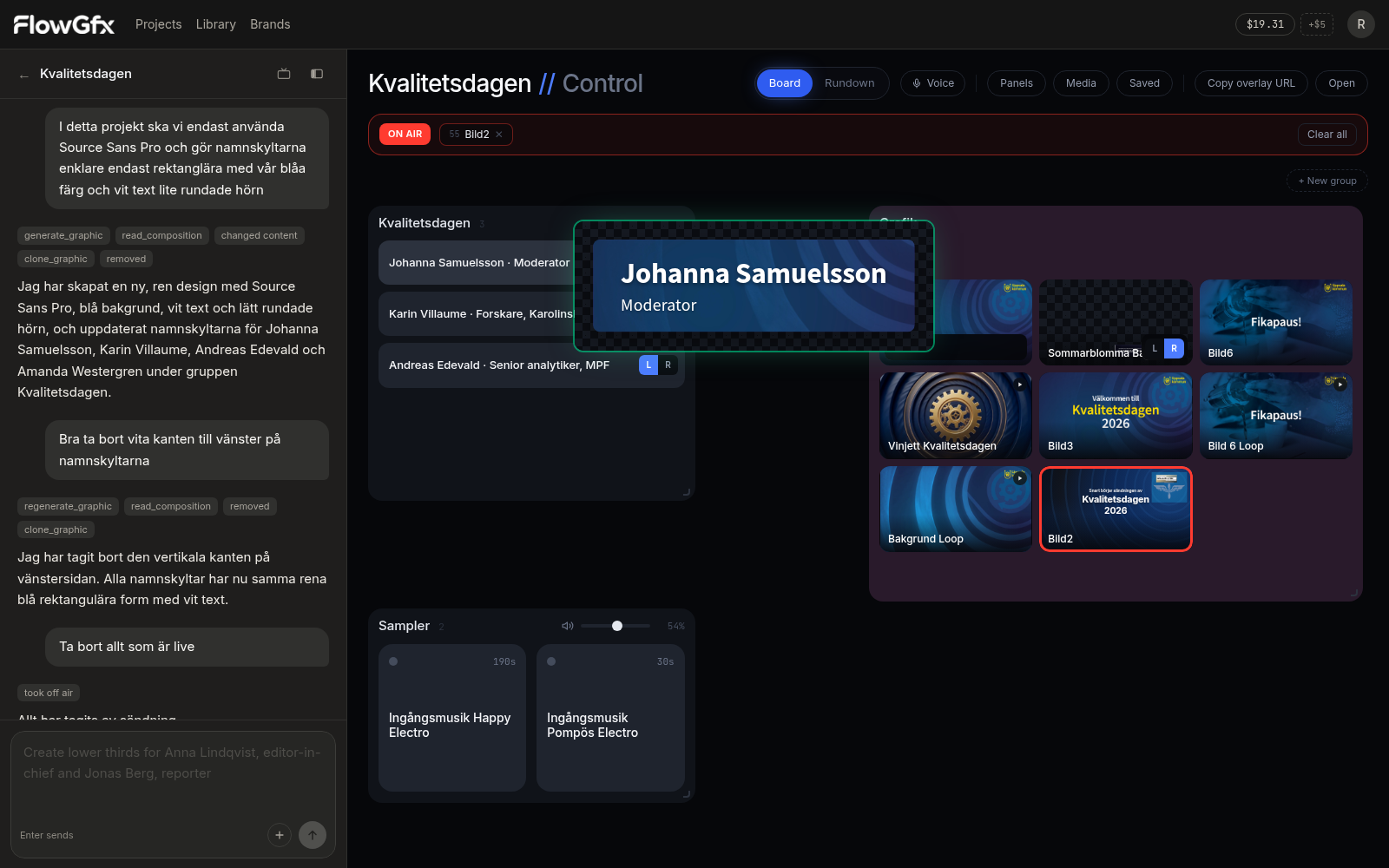
Chat with the agent on the left — your graphics appear on the board, ready to go live.
See it in action
From idea to on-air in under a minute
No design software. No templates. Tell the agent what you need and watch it appear on your board, ready to take live.
"I need lower thirds for my interview guests: Dr. Maya Patel, Neuroscientist; James Rodriguez, Tech Journalist; and Lisa Thompson, CEO"
Or just speak — voice works too
The assistant
Ask for a graphic. Get a button on the board.
Say what you need — a name plate, a sting, a countdown card. The assistant makes it, checks it's broadcast-safe, and puts a button on your board. No menus to click through. No templates to hunt for.
When there's a choice to make, it asks with buttons — not paragraphs. Before any render that costs money, you see the price. And when you tell it something once (this typeface, this color, guests go here), it remembers.
Try it yourselfYou
Kvällens gäster: Anna Lindqvist, chefredaktör. Jonas Ek, mittfältare. Sara Holm. Gör namnskyltar.
Worth knowing: You asked in Swedish, it answered in Swedish. Works in whatever language you're thinking in.
Real examples. Every tool shown here actually exists, and the prices come from the same rate card the assistant uses when it charges you.
How it works
From nothing to on-air in four steps.
- 01
Tell it what you need
Type a list of guests. Paste the running order. Describe a break card. Whatever language you think in, it answers in the same one.
- 02
It builds, you don't
The agent makes the graphic and checks it's broadcast-safe — inside title safe, transparent for keying, frame-accurate. If something's wrong, it fixes it before the graphic reaches your board.
- 03
Arrange your board
Drag buttons around. Group guests together, stings in a row, breaks in their own card. Some graphics have controls right on the button — a countdown timer, a score, which side of frame.
- 04
Run the show
Tap a button, hand a panel to someone's phone, or just say it: "take Anna." Multiple graphics can be live at once. One browser source into your switcher.
The models
8 video models. 5 for audio. 10 for stills.
They're all built in. No API keys. No other accounts. Just ask for what you need. You pay what fal charges plus 25%, and the assistant always shows you the price before it spends anything.
Video
Three families, 8 endpoints
- MiniMax H3from $0.05/s
Goes up to 4K. Follows your prompt closely. Use this for the final version that goes to air.
- MiniMax H3-maxfrom $0.05/s
Tops out at 1080P but moves better. It'll interpret your brief a bit — sometimes that's what you want.
- MiniMax H3-max Turbofrom $0.025/s
Half the price of H3-max. Good for trying ideas before you commit. No logo input on this one.
- H3 and H3-max each take your logo, a still picture, or nothing but words. A render runs five to fifteen seconds, and a 480P draft costs a fraction of the master you end up keeping.
Audio
Openers, beds, stabs and songs
- Stable Audio$0.05 flat
Stings and beds up to 47 seconds. Good for openers and transitions.
- Sonilo music$0.0025/s
Instrumental music up to ten minutes. Works well under a whole segment.
- Sonilo sound effects$0.0018/s
Sound effects — a whoosh, an impact, room tone. One sound, not a track.
- MiniMax Music 3$0.002/s
Sung music up to five minutes. Give it lyrics and it'll sing them.
- MiniMax Music 2.6$0.15 flat
A full produced track. Picks its own length, charges a flat fee.
Stills
Generated, edited, cut out
- Nano Banana 2$0.08
Fast and cheap. Backdrops, plates, anything you might animate later.
- Nano Banana Pro$0.15
Same as above but with more care. Worth it for featured stills.
- GPT Image 2.5 Flare≈ $0.08
Good default when you need detail to hold up.
- GPT Image 2.5 Sunburst≈ $0.12
The high-end option. For stills that carry a whole card.
- Grok Imagine 2.0$0.06
Cheapest way to test an idea before committing to a better model.
- Pixelcut Background Removal$0.016
Removes the background from a logo or portrait. Gives you a PNG.
- 4 of them also edit a picture you already have, which is usually the faster route to the one you wanted.
Text graphics don't use AI at all
Name plates, tickers, break cards — anything with words renders as HTML. Instant. Spelled exactly right. Change them as many times as you want. AI models can't do text well, so we don't use them for it.
Live
Say “take Anna” and Anna is on air
Voice control works while you're live. Say a name, a group, the words on a graphic — it matches what you said to the buttons on your board. No wake word. No fixed phrases. Just talk like you would to a colleague.
- Hands-free during the show
- Tap to listen, say what you need, tap again. It shows you what it heard and what it did — and keeps it on screen so you can glance over and check.
- Voice only takes graphics on and off
- On purpose. You build and restyle with typing, before the show. A misheard word during a live broadcast should never change a graphic that's on air.
- Share a panel to any phone
- Send someone a QR code. They get just the buttons — a guest list, a rack of stings, whatever you share. No account needed. Nothing to figure out at one minute to air.
- One URL into your switcher
- The output is a browser source — transparent, title safe, at whatever size you set. Paste it into OBS, vMix or Tricaster. Multiple graphics can be live at once on different layers.
Pricing
You pay for AI generation. That's it.
Every plan gets every feature — the board, voice control, phone panels, playout. The only difference is how much AI generation is included. We charge what fal charges us, plus 25%.
Free
Enough to watch it build something real before you pay for anything.
No commitment, no card
- $1 of generation to start
- 1 seat
- AI creation spends your starting grant
- Board, voice, panels and playout
- No card required
Creator
One person running their own show.
$10.00 of generation included
- $10 of generation a month
- 1 seat
- Rebuild designs with AI from your monthly grant
- Every model, video up to 4K
- Voice control and phone panels
Studio
A gallery with more than one show in it.
$45.00 of generation included
- $45 of generation a month
- 3 seats included, +$25/seat
- Unlimited projects, brands and saved designs
- Workspace roles: Owner, Admin, Operator, Creator
- Every model, video up to 4K
Agency
Production houses billing the render on.
$160.00 of generation included
- $160 of generation a month
- 10 seats included, +$20/seat
- Unlimited projects, brands and saved designs
- Workspace roles with fine-grained access
- Every render priced before it runs
Broadcast
Rights holders and permanent installations.
Shaped around your production
- Volume pricing on generation
- Custom seat count
- A playout channel per studio
- On-prem rendering where needed
- SLA and a named contact
Real prices, right now
These come from the same rate card the assistant uses. What you see here is what you'll pay.
- 10-second sting on your logo (768P)
- $0.75
- Same sting at 4K
- $2.00
- 10-second opener music
- $0.07
- Name plates, tickers, break cards — edit all day
- Free